
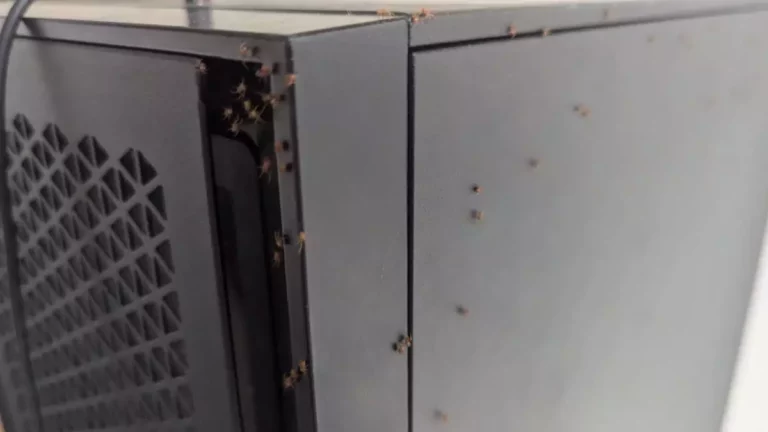
It’s a common nightmare for tech enthusiasts—you’re comfortably seated at your PC, engrossed in work or gaming, when suddenly, out of the corner of your eye, you spot a spider crawling near your computer. The clash between spiders and PCs is an amusing yet unsettling phenomenon that many experience. While spiders serve an essential role in the ecosystem, their presence inside our electronics triggers a mix of disgust, panic, and intrigue.
The thought of spiders lurking within a PC case, among delicate hardware components, is unsettling. Not only do they disrupt our sense of security, but their intrusion also raises questions about how and why they end up inside our digital sanctuaries. In this article, we explore a particularly harrowing tale from Reddit that highlights the bizarre connection between spiders and PCs and what we can learn from it.
Why the Idea of Spiders in Your PC Is So Disturbing
The fear of spiders and PCs colliding taps into something deeper than simple dislike for bugs. It’s a psychological response rooted in invasion of personal space, loss of control, and technology anxiety. Your PC is more than a machine—it’s a trusted environment. It holds your work, your memories, your entertainment, and in many cases, your livelihood. The idea that spiders could be crawling inside that space feels like a violation.
Spiders also trigger instinctive fear in many people. Combine that with the thought of them hiding among sensitive computer components, and your brain jumps straight to worst-case scenarios. What if they crawl out while you’re working? What if they damage something expensive? What if there are more you can’t see?
That’s why stories involving spiders inside computers spread so quickly online. They mix two very different worlds—nature and technology—into one unsettling experience. When spiders and PCs intersect, it challenges the illusion that our digital spaces are clean, controlled, and sealed off from the outside world.
Why PCs Attract Spiders in the First Place
Despite how advanced modern computers look, PCs can be surprisingly inviting to spiders. The main reason is warmth. Running computers generate heat, especially around power supplies, GPUs, and processors. For spiders, warmth signals a safe and stable environment.
Darkness is another factor. PC cases are enclosed, quiet, and rarely disturbed—perfect conditions for spiders that prefer to stay hidden. Add dust buildup, and you’ve created an even more attractive space. Dust traps small insects, which can become food sources, indirectly drawing spiders closer.
Finally, there are hidden entry points. Ventilation holes, cable openings, and poorly sealed cases provide easy access. Even small gaps are more than enough for tiny spiders to slip inside. Over time, this is how spiders and PCs end up sharing the same space—without you ever noticing until it’s too late.
Do Spiders Actually Lay Eggs Inside Computers?
This is one of the most common fears—and fortunately, it’s less common than the internet makes it seem. While it can happen, spiders don’t typically seek out computers specifically to lay eggs. Most spiders prefer natural, undisturbed environments like cracks in walls, basements, garages, or storage areas.
However, if a PC is rarely cleaned, kept on the floor, and surrounded by dust or clutter, it can become an acceptable nesting location. In rare cases, a spider egg sac may end up inside a computer case, especially if the PC is unused for long periods.
The key takeaway? Spiders and PCs don’t naturally go together—but poor maintenance and environmental conditions can accidentally bring them together. Regular cleaning dramatically reduces this risk.
Can Spiders Damage Your PC Hardware?
This is where myth and reality need to be separated. Spiders themselves do not chew wires, attack circuits, or intentionally damage hardware. They aren’t interested in electronics.
That said, spiders can cause indirect problems. Nesting materials and webs can accumulate around fans, vents, and airflow pathways. Over time, this buildup may contribute to overheating or reduced cooling efficiency.
In extreme cases—especially when combined with heavy dust—this can shorten component lifespan or cause thermal throttling. So while spiders won’t directly destroy your PC, ignoring an infestation isn’t risk-free either.
How Spider Webs and Dust Can Affect PC Cooling
Proper airflow is critical for keeping a computer healthy. Fans pull cool air in and push hot air out. When spider webs mix with dust, they form dense clumps that block vents and fan blades.
This blockage forces your PC to work harder to regulate temperature. The result can be:
Higher internal temperatures
Louder fans running at maximum speed
Reduced performance during gaming or heavy workloads
Long-term wear on components due to excess heat
This is why regular cleaning matters. Preventing dust buildup not only keeps spiders and PCs separate, but also protects your system’s cooling efficiency and overall performance.
Real Reactions: How Reddit Responded to the Spider PC Incident
When the story of spiders and PCs colliding hit Reddit, reactions poured in instantly. Some users responded with genuine horror, admitting they would have abandoned the computer altogether. Others leaned heavily into humor, joking about “burning the PC,” “exorcising the case,” or “declaring the spiders the new owners.”
Beyond the jokes, many community members offered practical advice. Experienced PC builders recommended vacuuming, deep cleaning, and inspecting every corner of the case. A few shared similar horror stories, confessing they had once discovered ants, cockroaches, or spiders inside their own machines. These shared experiences helped normalize the situation and reminded readers that while disturbing, it’s not unheard of.
The mix of fear, comedy, and solid technical advice showed one thing clearly: when spiders and PCs intersect, the internet becomes both a support group and a comedy club.
What NOT to Do If You Find Spiders in Your PC
Panic is the most natural response—but it’s also the most dangerous for your hardware. If you discover spiders in your PC, avoid these common mistakes:
Do not spray insecticide directly into the PC. Liquid sprays can damage circuits and leave harmful residue.
Do not shake or slam the case. This can loosen components, damage connectors, or crack the motherboard.
Do not pour water or cleaning fluids inside. Even small amounts of moisture can permanently ruin electronics.
Do not turn the PC back on immediately. Running the system before inspection can spread debris or webs into fans.
When dealing with spiders and PCs, calm and controlled action is far safer than emotional reactions.
Step-by-Step Guide: How to Safely Remove Spiders From Your PC
If you want to handle the situation properly, follow this practical checklist:
Power down and unplug the PC completely. Safety comes first.
Move the PC to a well-lit, open area. Preferably outside or in a garage.
Open the PC case carefully. Use proper tools and avoid touching components unnecessarily.
Use a vacuum with a narrow nozzle. Gently remove visible spiders, webs, and dust.
Inspect corners, fans, and vents. These are common hiding spots.
Clean with compressed air. Blow out remaining debris from safe distances.
Wipe the case interior lightly with a dry microfiber cloth.
Reassemble only after confirming everything is clean and dry.
This approach minimizes risk to your system while resolving the spider problem effectively.
Is It Safe to Use Insect Spray Near Electronics?
Short answer: no. Insect sprays are not designed for electronics. Most contain liquids, oils, or chemicals that can corrode components, short circuits, or leave residue that attracts dust.
If you’re dealing with spiders and PCs, physical removal and cleaning are always safer than chemical solutions. If pest control is necessary, treat the room, not the computer—and only after the PC has been removed from the area.
How Often Should You Clean Your PC to Prevent Infestations?
Regular maintenance is your best defense against spiders and insects. A simple schedule works well:
Light cleaning every 1–2 months: Dust vents, fans, and the exterior.
Deep cleaning every 3–6 months: Open the case and remove internal dust.
Immediate cleaning: If your environment is dusty, humid, or near the floor.
Consistency matters more than intensity. Clean PCs are less attractive to spiders and perform better overall.
Best PC Placement to Avoid Spiders and Insects
Where you place your PC makes a big difference:
Desk placement is better than floor placement. Floors attract more insects.
Avoid pushing PCs directly against walls. Gaps allow spiders to climb inside.
Keep away from windows, plants, and storage areas.
Maintain a clean, dry room. Humidity and clutter attract pests.
Strategic placement reduces the chances of spiders and PCs ever crossing paths.
Are Spider Infestations in PCs Common or Rare?
They are rare, but not impossible. Most PC owners will never experience a spider infestation. When it does happen, it’s usually linked to poor cleaning habits, long periods of inactivity, or environmental factors.
Understanding this helps reduce panic. Finding spiders in a PC doesn’t mean your home is infested or your equipment is unsafe—it simply means conditions allowed it temporarily.
What This Story Teaches Us About Technology and Nature
The story highlights an uncomfortable truth: technology doesn’t exist in isolation. No matter how advanced our devices become, they still live in the natural world. Dust, insects, and environmental factors will always find ways to interact with our machines.
The relationship between spiders and PCs is a reminder that control is never absolute. Awareness, adaptability, and maintenance are how we bridge the gap between nature and technology.
Final Takeaway: Keeping Spiders Out of Your PC for Good
✔ Spiders and PCs don’t naturally belong together—but neglect can bring them together
✔ Regular cleaning and proper placement prevent most infestations
✔ Calm, methodical action protects your hardware
✔ Avoid chemicals and panic-driven reactions
With basic care and awareness, you can keep your PC clean, efficient, and spider-free. And if an unexpected visitor ever shows up again, you’ll know exactly what to do—without fear, panic, or damage.

Leave a Reply